
You hit “send” on your Bitcoin transaction. The confirmation screen pops up.
Your stomach drops. The network fee is astronomical. It feels like a robbery.
Why does it cost so much to send your own money?
You are not alone in this frustration.
Bitcoin fees are one of the biggest pain points for newcomers and experts alike.
They can spike from pennies to hundreds of dollars without warning.
But there is a reason for this chaos.
The Price of Sovereignty: Why Bitcoin Fees Matter
It is not a flaw. It is a feature of a deliberate design.
This guide will cut through the confusion.
We will explain the simple economics behind Bitcoin fees.
You will learn what causes these dramatic spikes.
Most importantly, you will get a practical toolkit to avoid overpaying and keep more of your hard-earned Bitcoin.

If you’re brand new and want a simple, no-nonsense walkthrough, this Rebel’s Guide to Buying Bitcoin breaks down everything step by step.
The Digital Auction: Why Fees Exist in the First Place
Bitcoin is not a free service. It is a global network secured by miners.
These miners use powerful computers to validate transactions and add them to the blockchain.
This process costs them real money for electricity and hardware.
Their compensation comes from two sources:
- The Block Reward: Newly created bitcoin given to the miner who solves a block.
- Transaction Fees: Payments added by users to get their transactions included.
Fees are essentially a priority auction. Miners have limited space in each block.
They will always choose to include the transactions that pay them the highest fees first.
When the network is busy, you must bid higher to get ahead in line.
The Four Culprits Behind Your High Fees
Several factors combine to create those painful fee spikes.
Understanding them is the first step to beating them.
1. Network Congestion: The Digital Traffic Jam
Imagine a single-lane highway during rush hour.
Bitcoin’s blockchain is that highway.
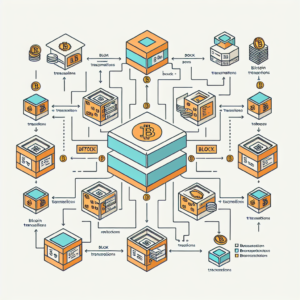
Each block can only hold a certain amount of data (around 1-4 MB worth of transactions).
When too many people try to send Bitcoin at once, a traffic jam forms.
This waiting room of unconfirmed transactions is called the mempool.
During a bull market or a major news event, activity explodes.
Everyone wants to move their coins at the same time.
To get ahead in the line, users start offering higher fees.
This bidding war pushes the cost for everyone sky-high.

2. The Fixed Block Size: Artificial Scarcity
Bitcoin’s block size is limited by design.
This artificial scarcity is crucial for keeping the network decentralized and secure.
However, it also means there is a hard cap on how many transactions can be processed every 10 minutes.
Demand often exceeds supply.
Basic economics takes over: limited supply + high demand = higher prices.
3. Complex Transactions: The Data Hog
Not all transactions are created equal.
A simple send from one address to another is small.
But transactions with many inputs (like spending from a wallet with many small deposits) are much larger in data size.
Simple TX: Small data size, lower fee.
Complex TX: Large data size, higher fee.
Miners charge fees based on the virtual byte (vByte) size of your transaction, not its dollar value.
Sending $100 or $1,000,000 in a simple transaction costs roughly the same fee.

If you’ve heard “not your keys, not your crypto” but never fully understood it, this [deep dive into Bitcoin wallet ownership] connects the dots.
4. The Fee Market: You Set the Price
This is the most important concept. You choose the fee you want to pay.
Your wallet just suggests a rate based on current network conditions.
Most people blindly accept the “High Priority” suggestion without realizing they can choose “Low” or set a custom fee.
The “high fee” you see is simply what other users are currently willing to pay to get confirmed quickly.
How Fees Are Calculated: A Simple Formula
Forget complex math.
The fee calculation is straightforward:
Total Fee = Transaction Size (in vBytes) x Fee Rate (in satoshis per vByte)
A satoshi is the smallest unit of Bitcoin (0.00000001 BTC).
vBytes measure your transaction’s data weight.
Example: If your transaction is 250 vBytes and the going rate is 100 satoshis/vByte, your fee will be 25,000 satoshis (or 0.00025 BTC).
You can see why complex transactions cost more.
They have a larger vByte size, so they get multiplied by that same
high fee rate.
Your Toolkit: 5 Proven Ways to Lower Your Bitcoin Fees
You do not have to be a victim of high fees.
Use these strategies to take control.
1. Time Your Transactions (The Easiest Win)
Network congestion is not constant. It follows predictable patterns.
Avoid Weekday Peak Hours: Fees often spike during business hours in the US and Europe.
Trade on Weekends: Saturday and Sunday (UTC time) are typically much quieter.
Monitor the Mempool: Use a site like mempool.space to see live network congestion.
Send your transaction when the graph is green (low congestion), not red (high congestion).
2. Use a SegWit Address
Segregated Witness (SegWit) is a technical upgrade that makes transactions smaller.
A smaller transaction size means a lower fee for the same priority level.
Most modern wallets (like Phoenix or BlueWallet) use SegWit by default.
Your address will start with bc1q.
If your address starts with 1 or 3, you are using an old format and likely overpaying.
3. batch Your Transactions
If you need to send Bitcoin to multiple people, batch the payments.
Instead of sending three separate transactions (and paying three separate fees), combine them into one transaction with three outputs.
This drastically reduces your total fee cost.

4. Set Custom Fees manually
Stop letting your wallet decide. Be a savvy shopper.
Check mempool.space for the current “low priority” fee rate.
In your wallet, choose the custom or manual fee option.
Set a fee rate that matches the current low priority rate.
Your transaction might take a few hours or even a day to confirm, but you will save a significant amount.
For nonurgent moves, this is the smartest choice.
5. Embrace the Lightning Network
For small, daily transactions, the base Bitcoin layer is the wrong tool.
The Lightning Network is a second layer built on top of Bitcoin.
It is designed for speed and cheap microtransactions.
Fees: Fractions of a penny.
Speed: Instant confirmations.
Use Case: Buying coffee, tipping online, or any small, frequent payment.
Think of it like this: The Bitcoin base layer is for settling large, important transactions (moving your savings).
The Lightning Network is for everyday spending.

|
Strategy
|
Best For
|
Fee Savings
|
Confirmation Time
|
|---|---|---|---|
|
Timing
|
Non-urgent transfers
|
High
|
Slow (hours/days)
|
|
SegWit
|
Everyone
|
Medium
|
No change
|
|
Batching
|
Multiple payments
|
Very High
|
No change
|
|
Custom Fees
|
Patient users
|
High
|
Slow (hours)
|
|
Lightning Network
|
Small, daily payments
|
Extreme
|
Instant
|
A great way to start using Bitcoin without worrying about on-chain fees is through a service like Swan Bitcoin.
You can set up automatic purchases and, when you’re ready, withdraw a larger amount to your personal wallet all at once.
This minimizes fee exposure and keeps more of your bitcoin intact.

The Future of Bitcoin Fees
Fee spikes are a natural part of Bitcoin’s life.
As adoption grows, competition for block space will only increase.
This is why Layer 2 solutions like the Lightning Network are so critical.
They allow billions of small transactions to happen off-chain, freeing up the base layer for larger, more valuable settlements.
The fee market itself is a signal.
It signals that people value getting their transaction onto the world’s most secure monetary network.
While sometimes painful, this system is exactly what keeps Bitcoin decentralized, secure, and neutral—without any central authority setting the rules.

Stop Overpaying and Start Optimizing
High Bitcoin fees are not random. They are the result of a transparent auction on a crowded network.
You now understand the players: miners, limited block space, and your own choices.
Stop accepting the default “High Priority” fee.
Become a smart user. Time your transactions, use SegWit, and set custom fees.
For the cost of a little patience, you can keep more of your Bitcoin where it belongs—in your pocket.